OAuth Overview
Apps that want to use the Dropbox Sign API to perform actions (i.e. sending signature requests) or access data on behalf of their users need to get their user’s consent. Each user must complete an OAuth flow, where they grant permission for your app to interact with their Dropbox Sign data. Dropbox Sign uses OAuth 2.0 so that users can securely grant access to apps built with the Dropbox Sign API.
Build With OAuth
This page contains overview information about Dropbox Sign and OAuth. For information around implementation, please review our OAuth Walkthrough.
Access Tokens
Once a user completes an OAuth flow and grants permission to connect your app, an access token is returned to your app. That access token is is authorized to call the Dropbox Sign API on that user’s behalf.
The access token can be used to send API calls by setting the HTTP header Authorization: Bearer <oauth2-access-token>.
Billing Model
Dropbox Sign apps using OAuth must select one of the following billing models:
- “Charge users” — full access apps that charge the user you’re sending calls on behalf of.
- “Charge me” — limited access apps that charge you, the app owner.
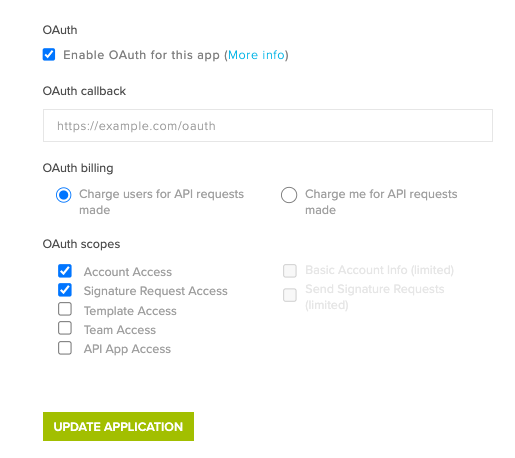
Different scopes are available depending on the billing model you choose. Please review the scope section below to determine which model makes sense for your app.
Access scopes
The Dropbox Sign API uses access scopes, which you can think of as bundles of permissions, to determine which actions your app is allowed to perform on a user’s behalf. The scopes selected in your API app’s settings are applied to the access tokens generated by your app. The scopes are also shown to your end users on the OAuth consent page — allowing them to see the exact level of access they’re agreeing to when they connect your app.
At the time of writing, scopes are generally organized into major objects or actions that tend to be used together. For example, the “Signature Request Access” scope includes access to the Embedded and Unclaimed Draft objects, which interact with signature requests.
Scope changes require re-authorization
Once your users have authorized access to your app, any changes to the scopes of the app will remove their authorization and they’ll need to complete another OAuth flow to issue a new access token that reflects those scopes.
OAuth scopes where app owner is charged
API requests sent using this model are billed to the owner of the Dropbox Sign API app.
OAuth scopes where users are charged
API requests sent using this model are billed to the user of the Dropbox Sign API app.
The OAuth Endpoints on the subsequent pages contain example payloads, request / response schemas, and SDK code examples, but the Try it console is currently disabled.

