# Expiration
> Add an expiration to your Signature Request to limit the length of time a document can be signed. Once expired, signers can no longer sign the Signature Request.
# Signature Request Expiration Date
Signature Request Expiration Date allows requesters to create and send signature requests that have a specific date and time for signers to sign before. If all signers have yet to sign the document by that time, the signature request will expire.
### Sending a Signature Request with an Expiration Date
An expiration date is defined by passing an `expires_at` parameter, which accepts an epoch timestamp representing the point in time the signature request should expire. This is supported in all our OpenAPI SDKs.
The `expires_at` parameter is supported by the following endpoints:
* [/signature\_request/send](/api/signature-request/send)
* [/signature\_request/create\_embedded](/api/signature-request/create-embedded)
* [/signature\_request/update](/api/signature-request/update)
* [/unclaimed\_draft/create](/api/unclaimed-draft/create)
* [/unclaimed\_draft/create\_embedded](/api/unclaimed-draft/create-embedded)
#### Validations Applied to `expires_at`
1. `expires_at` must be an integer epoch timestamp in seconds between 1-90 days in the future.
2. `expires_at` will be rounded down to the nearest hour.
#### Example
## Expiration Process
A signature request expires when one or more signers have yet to sign the signature request before the expiration date. Only signature requests that explicitly set an `expires_at` will expire. By default signature requests do not expire.
### Details
#### Signature Status
After an `expires_at` date has passed, each signature on the signature request that is not been completed will enter the expired status, and the overall signature request will be considered expired. You can determine whether a signature request is expired by checking each each `signature` object in the `signatures` array for `"status_code": "expired"`.
#### Document Access
All parties to the signature request will still have access to the document including audit trail, similar to `declined` signature requests. They will not be able to sign or modify the signature request additionally at that time, and won't have access via the Signer App.
#### Signing Behavior
Signers that completed signing before expiration will be marked with `"status_code": "signed"`. However, for each signer who has yet to sign the signature request, they will be marked `"status_code": "expired"` and the document will no longer be available for signing.
#### Expiration Notification
An expired signature request will trigger notifications.
* **Non-embedded signing flows** - once expired, we will send an [email](#signer-emails-for-expiration-non-embedded) to each signer and requester stating the signature request has expired at the specified signature request expiration date.
* **Embedded signing flows** - upon expiration, a `signature_request_expired` [event](/docs/guides/events-and-callbacks/overview) will be sent to your integration.
#### Audit Trail
On the audit trail, the signature request will be shown as in an `expired` status, with an `expired` audit event with the expiration date listed along with all the signers who did not sign by the expiration date. Once a signature request has expired, it is considered to be in a final status like `declined` and `completed` signature requests.
## Signing a Signature Request with an Expiration
During signing, the signer will see the signature request expiration date in the banner next to the number of required fields to sign on the signature request. The time will be the users local timezone at the time of signing. If they attempt to sign the signature request past the expiration date, they will receive an error stating that the signature request is closed.
 ### Signer Emails for Expiration (Non-embedded)
For signing flows that include emails, signers are notified of expiration date in the emails sent to them about signature requests. The date and time will be displayed in their preferred timezone based on their Dropbox Sign account settings.
Emails are muted in all embedded signing flows. Integrations using embedded signing must consume the signature\_request\_expired event.
| Email | Screenshot |
| --------------------------------------------------------------------------------------------------------------------------------------------------------------------------------------------------------------------------------------------------------------------------------------------- | ------------------------------------------------------------------------------------------------------------ |
|
### Signer Emails for Expiration (Non-embedded)
For signing flows that include emails, signers are notified of expiration date in the emails sent to them about signature requests. The date and time will be displayed in their preferred timezone based on their Dropbox Sign account settings.
Emails are muted in all embedded signing flows. Integrations using embedded signing must consume the signature\_request\_expired event.
| Email | Screenshot |
| --------------------------------------------------------------------------------------------------------------------------------------------------------------------------------------------------------------------------------------------------------------------------------------------- | ------------------------------------------------------------------------------------------------------------ |
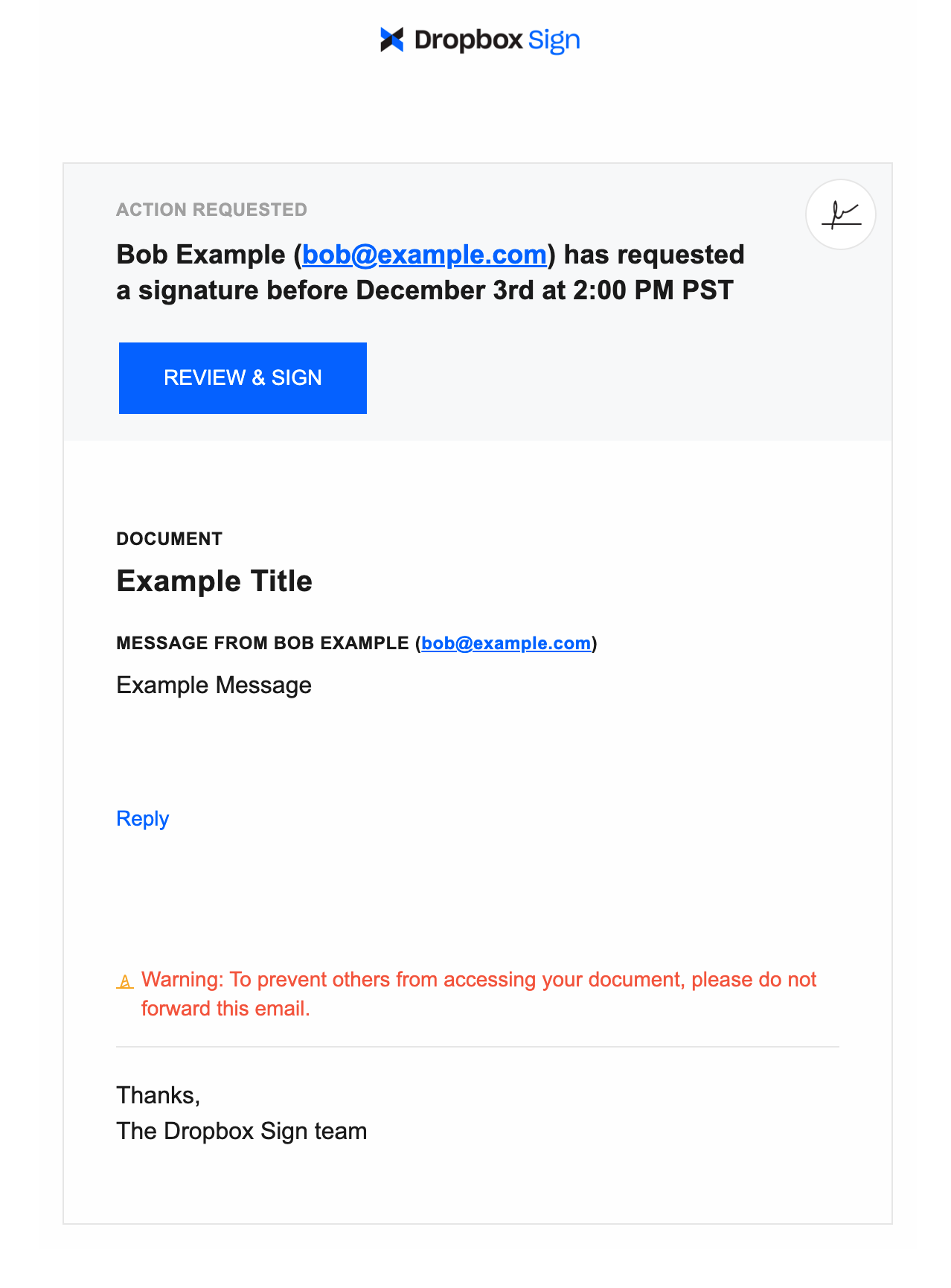
| Send and Update
For both send and update, the signer will receive an email including the signature request expiration date in the subject and body of the email.
|  |
|
|
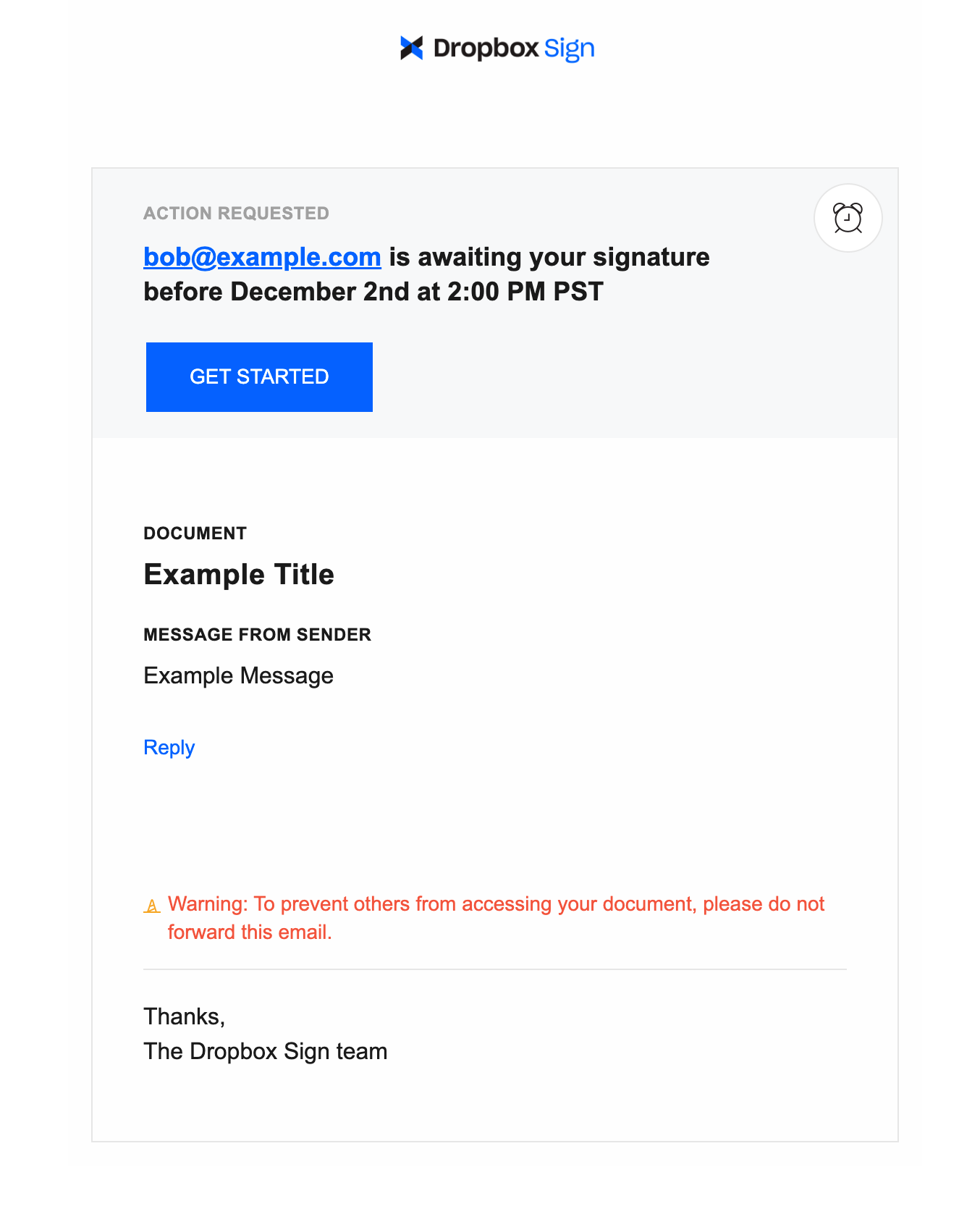
| Reminder
Signature request reminder emails will be sent to the signer 3 and 7 days before the signature request expires, this is in addition to our other current automated reminders. If a signer was already reminded within 24 hours, we will skip the automated reminder.
|  |
|
|
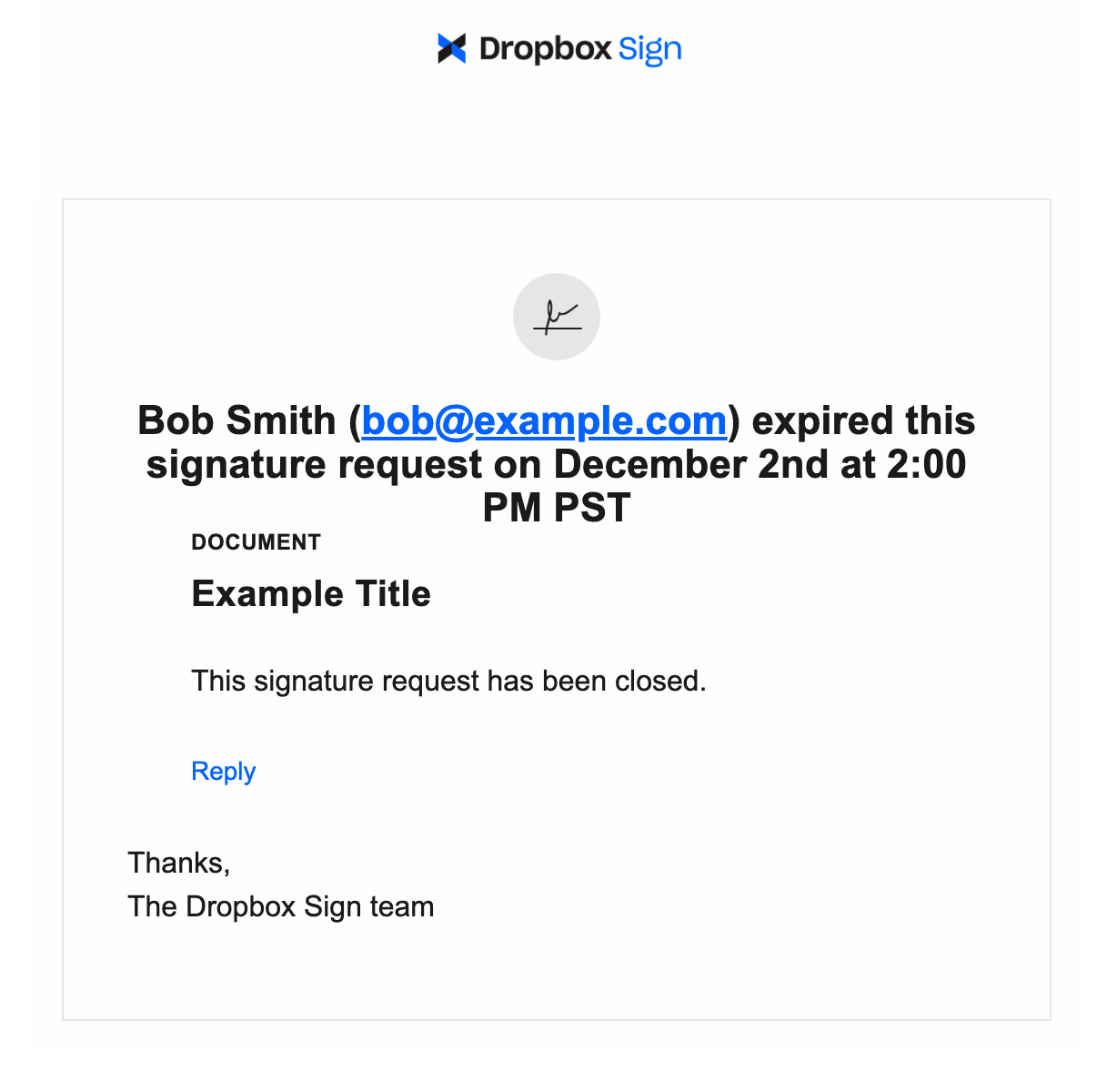
| Expired
An expired email is sent to all signers and the requester when a signature request expired stating the requester has expired the signature request at the expiration date specified.
|  |
## Building Expiration into Your Integration
### Web Surfaces
From DropboxSign.com you can filter by expired status in your Documents page and API Dashboard and will be displayed as being `expired`.
### Searching
We currently don't support searching by `expired` status in [/signature\_request/list](/api/signature-request/list) at this time nor expiration date. See [search](/api/manual-reference-pages/search) for details
### Unclaimed Drafts
When setting an expiration using [Embedded Requesting](/docs/walkthroughs/embedded-requesting), users creating a signature request using the `claim_url` can select an expiration date but not a specific time. The time will be inferred from the local timezone of the user's browser.
If the user does not change the expiration, it will retain the `expires_at` set when the draft was initially created. To display the date picker for the signature request expiration date, you need to send a valid value for `expires_at` when creating the [unclaimed draft](/api/unclaimed-draft).
***
## FAQ
### The `expires_at` in the response for unclaimed draft is different than what I set. Why?
Unclaimed drafts generate a `claim_url` that is only accessible for a set period of time. That means the `expires_at` on an [Unclaimed Draft](/api/unclaimed-draft) object is **different** than `expires_at` applied to [Signature Request](/api/signature-request) object.
```json title="expires_at in Unclaimed Draft"
{
"unclaimed_draft": {
"claim_url": "https://app.hellosign.com/send/resendDocs?root_snapshot_guids[]=7f967b7d06e154394eab693febedf61e8ebe49eb&snapshot_access_guids[]=fb848631&root_snapshot_guids[]=7aedaf31e12edf9f2672a0b2ddf028aca670e101&snapshot_access_guids[]=f398ef87",
"signing_redirect_url": null,
"expires_at": 1414093891,
"test_mode": true
}
}
```
```json title="expires_at in Signature Request"
{
"signature_request": {
"signature_request_id": "2b388914e3ae3b738bd4e2ee2850c677e6dc53d2",
"test_mode": true,
"title": "OriginalDocument",
"original_title": "OriginalDocument",
"subject": "Example Subject",
"message": "Example Message",
"metadata": {},
"created_at": 1671140704,
"expires_at": 1671987600,
"is_complete": false,
"is_declined": false,
"has_error": false,
"custom_fields": [],
"response_data": [],
"signing_url": "https://app.hellosign.com/sign/2b388914e3ae3b738bd4e2ee2850c677e6dc53d2",
"signing_redirect_url": null,
"final_copy_uri": "/v3/signature_request/final_copy/e4430b36cbabd6d0ed00d1a65a1bfc0260ff7bff",
"files_url": "https://api.hellosign.com/v3/signature_request/files/2b388914e3ae3b738bd4e2ee2850c677e6dc53d2",
"details_url": "https://app.hellosign.com/home/manage?guid=2b388914e3ae3b738bd4e2ee2850c677e6dc53d2",
"requester_email_address": "me@hellosign.com",
"signatures": [
{
"signature_id": "78caf2a1d01cd39cea2bc1cbb340dac3",
"has_pin": false,
"has_sms_auth": false,
"has_sms_delivery": false,
"sms_phone_number": null,
"signer_email_address": "jack@example.com",
"signer_name": "Bob Smith",
"signer_role": null,
"order": null,
"status_code": "awaiting_signature",
"signed_at": null,
"last_viewed_at": null,
"last_reminded_at": null,
"error": null
}
],
"cc_email_addresses": [],
```
|
## Building Expiration into Your Integration
### Web Surfaces
From DropboxSign.com you can filter by expired status in your Documents page and API Dashboard and will be displayed as being `expired`.
### Searching
We currently don't support searching by `expired` status in [/signature\_request/list](/api/signature-request/list) at this time nor expiration date. See [search](/api/manual-reference-pages/search) for details
### Unclaimed Drafts
When setting an expiration using [Embedded Requesting](/docs/walkthroughs/embedded-requesting), users creating a signature request using the `claim_url` can select an expiration date but not a specific time. The time will be inferred from the local timezone of the user's browser.
If the user does not change the expiration, it will retain the `expires_at` set when the draft was initially created. To display the date picker for the signature request expiration date, you need to send a valid value for `expires_at` when creating the [unclaimed draft](/api/unclaimed-draft).
***
## FAQ
### The `expires_at` in the response for unclaimed draft is different than what I set. Why?
Unclaimed drafts generate a `claim_url` that is only accessible for a set period of time. That means the `expires_at` on an [Unclaimed Draft](/api/unclaimed-draft) object is **different** than `expires_at` applied to [Signature Request](/api/signature-request) object.
```json title="expires_at in Unclaimed Draft"
{
"unclaimed_draft": {
"claim_url": "https://app.hellosign.com/send/resendDocs?root_snapshot_guids[]=7f967b7d06e154394eab693febedf61e8ebe49eb&snapshot_access_guids[]=fb848631&root_snapshot_guids[]=7aedaf31e12edf9f2672a0b2ddf028aca670e101&snapshot_access_guids[]=f398ef87",
"signing_redirect_url": null,
"expires_at": 1414093891,
"test_mode": true
}
}
```
```json title="expires_at in Signature Request"
{
"signature_request": {
"signature_request_id": "2b388914e3ae3b738bd4e2ee2850c677e6dc53d2",
"test_mode": true,
"title": "OriginalDocument",
"original_title": "OriginalDocument",
"subject": "Example Subject",
"message": "Example Message",
"metadata": {},
"created_at": 1671140704,
"expires_at": 1671987600,
"is_complete": false,
"is_declined": false,
"has_error": false,
"custom_fields": [],
"response_data": [],
"signing_url": "https://app.hellosign.com/sign/2b388914e3ae3b738bd4e2ee2850c677e6dc53d2",
"signing_redirect_url": null,
"final_copy_uri": "/v3/signature_request/final_copy/e4430b36cbabd6d0ed00d1a65a1bfc0260ff7bff",
"files_url": "https://api.hellosign.com/v3/signature_request/files/2b388914e3ae3b738bd4e2ee2850c677e6dc53d2",
"details_url": "https://app.hellosign.com/home/manage?guid=2b388914e3ae3b738bd4e2ee2850c677e6dc53d2",
"requester_email_address": "me@hellosign.com",
"signatures": [
{
"signature_id": "78caf2a1d01cd39cea2bc1cbb340dac3",
"has_pin": false,
"has_sms_auth": false,
"has_sms_delivery": false,
"sms_phone_number": null,
"signer_email_address": "jack@example.com",
"signer_name": "Bob Smith",
"signer_role": null,
"order": null,
"status_code": "awaiting_signature",
"signed_at": null,
"last_viewed_at": null,
"last_reminded_at": null,
"error": null
}
],
"cc_email_addresses": [],
```